


Lowe's
4.740.33K Reviews
App Specs
- Version
- 26.8.1
- Updated On
- License
- Free
- Downloads
- 10,000,000+
- Developer
- Lowe's Companies, Inc.
- Categories
- Shopping
- Platform
- Android, iOS
Screenshots
 Analysis by AppCompare
When I’m planning a repair or trying to work out which supplies I need, I like being able to check a store’s products before I make the trip. Lowe’s puts that shopping task on my phone, and its most useful details become especially clear when I’m already in a store or trying to avoid an unnecessary visit. The app is free, is rated for Everyone, and comes from Lowe’s Companies, Inc., the retailer behind the stores it helps shoppers navigate.
Where a reliable connection matters
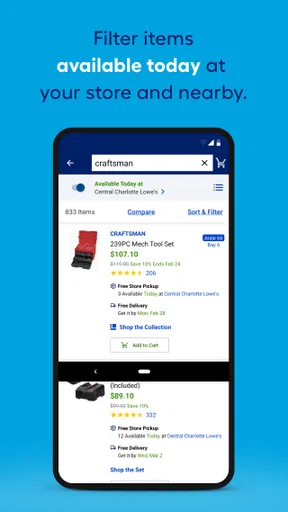
Product searches, store inventory, item details, and shopping information are most useful when the app can reach current online data. I’d check availability before setting out for a particular item, then check again if the project is time-sensitive. A stock result is a helpful planning signal, not a reason to assume every last unit will still be waiting when I arrive.
The same goes for comparing products. Specifications and customer reviews can help me narrow a choice at home, where I have time to think, while the product page can settle a question in the aisle. If the connection is slow, those online-dependent checks may take longer; I’d make a note of the item names or details I need rather than relying on a search loading at the exact moment I need it.
Useful in the aisle, with a little preparation
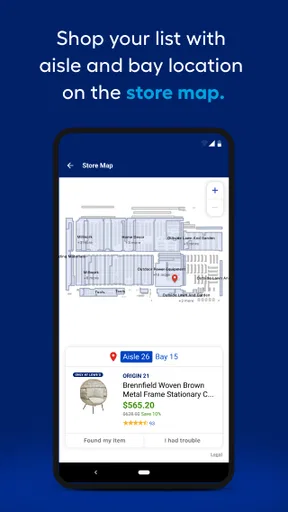
Home improvement shopping is often a mix of planned purchases and quick decisions. The app’s aisle and bay information can save a lot of wandering when I already know what I’m looking for. I find that most valuable in a large store, or when I’m trying to get back to a repair quickly instead of browsing every possible substitute.
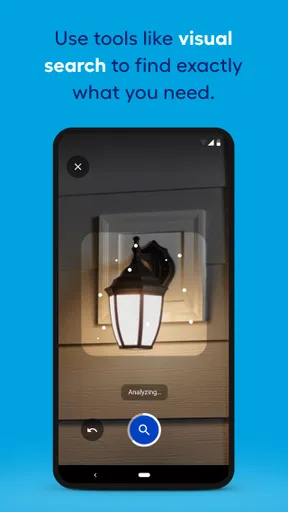
A practical workflow is to build a list before leaving home, check the local store’s stock, and use the aisle details once inside. If I’m unsure about a product, I can look at its specifications or reviews before choosing. Barcode scanning is another handy way to inspect an item while shopping, though it depends on having the phone and camera ready and a usable connection for any information that needs to load.
When plans change or the app slows down
Connectivity can be less dependable in a crowded store or in a spot where my phone struggles to get a signal. I wouldn’t make a long trip based on a single inventory check, and I wouldn’t leave an essential repair decision until I’m standing in an aisle with a weak connection. Saving likely purchases to a list ahead of time gives me a clearer plan, even if I still need to confirm current details online.
If a page takes time to appear, I’d try the search again when the connection improves or use the item details I already noted. For a project with several parts, writing down measurements and product names before shopping is useful regardless of the app; it prevents a stalled screen from becoming the only record of what I need. The app is a shopping aid, not a replacement for checking that a product is the right size or compatible with the job.
Worth Reading Before You Choose

EA SPORTS FC Mobile 26 Is a Bigger Football Game, but It Takes Time

Flipboard Shows What News Apps Must Do Beyond the Feed

Switching to Android Auto Means Rethinking Your Driving Routine

Google Calendar Makes a Crowded Week Easier to Manage

Ludo King Makes the Most of the Minutes Between Plans

Baby Panda World Brings Quick Play to Modern Phones, but Its Game Library Feels Busy
Making the most of searches, lists, and product pages
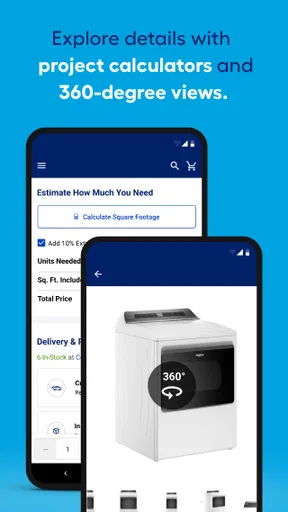
For an unfamiliar repair, I’d start with the problem and the basic item I think might solve it, then compare product details rather than choosing the first result. Search is useful for locating a known product, but broad searches can return options that look similar while serving different purposes. Reading specifications carefully is a better use of the app than treating a product name or photo as enough information.
Lists are particularly useful when a project needs supplies from several departments. I can separate what I need now from items I’m still considering, which makes it easier to keep the actual shopping trip focused. For comparison shopping, I’d save competing options and revisit the details before buying; that is more practical than trying to remember differences between products while moving around the store.
Reviews can add context, but I’d use them alongside the specifications, not in place of them. A customer’s experience may involve a different home, installation, or use case from mine. Similarly, the weekly promotions and sale alerts can help me spot a useful offer, but I wouldn’t choose a product solely because it is discounted. The right fit for the repair matters more than a tempting price.
Who will appreciate it—and who may prefer another route
This is a strong fit for people who shop at Lowe’s regularly, tackle household repairs, or want to compare products before visiting a store. It can be especially useful for someone who knows the rough materials needed but wants to check options, store stock, or where an item is located. With a 4.7 average from around 282,000 ratings and more than 10 million installs, it has attracted a substantial audience, although those figures don’t guarantee that every feature will suit every shopper.
If you buy home supplies from several retailers and mainly want a broad price comparison, a general shopping search may be a better first stop. Lowe’s is most directly useful for shopping within Lowe’s, rather than serving as a neutral comparison tool across every hardware seller. Likewise, someone who prefers speaking with store staff for every product decision may get less value from browsing specifications and reviews on a phone.
A realistic example: I notice a loose cabinet handle before work and want to replace it that evening. I can use the app to look for a similar style, review the product details, and add a likely replacement to my list. Before driving over, I check the local store’s inventory; once there, the aisle and bay information can help me find it. If the exact match isn’t available, I can compare alternatives, but I’d bring the old handle or its measurements rather than assume that a similar-looking item will fit.
Connection, data, and the final call
Because the most useful shopping checks involve live product and store information, I’d use a connection when researching, checking availability, or loading pages. To be considerate of mobile data, I’d do the heavier browsing and list-building on a trusted connection when convenient, then use the app in the store for focused tasks such as locating an item or scanning a barcode. That approach also makes a shopping trip less dependent on repeated searches while walking around.
Released on May 3, 2012, the app is now at version 25.12.1 and requires Android 11 or later on Android devices. Those details make it straightforward to check whether an Android phone meets the minimum requirement; the app is also available on iOS. I’d keep it updated through the relevant app store so I’m using the current version, especially if I rely on it for shopping information.
Overall, I see the Lowe's app as a practical companion for planning and completing a visit to its stores, not as a substitute for measuring carefully, checking compatibility, or comparing every retailer. Its aisle guidance, lists, barcode scanning, and product information can make home-improvement shopping more organized, while its usefulness for current inventory and online details naturally depends on connectivity. If you often shop at Lowe’s, it’s worth trying; if you rarely shop there or want a retailer-neutral tool, another shopping option may fit better.
Getting Started with Lowe's
First things first, you’ll need to download the Lowe's app from your respective app store. The installation is a breeze, and once you open it up, you’re greeted with a clean and straightforward interface. The app is designed to make your shopping experience as smooth as possible, and I’ve got to say, they nailed it.
Once you’re in, you’ll notice the homepage is filled with options. You can search for specific items, browse through categories, or even check out the latest deals. The search function is pretty robust, and I found it quick and efficient, even if you’re looking for something as obscure as a left-handed widget.
Features You’ll Love
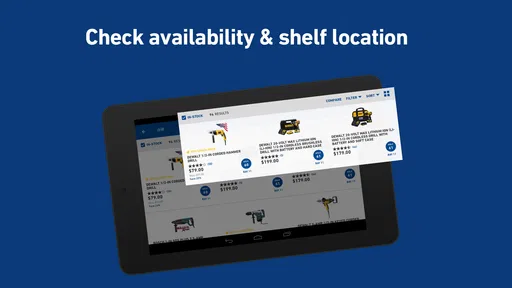
One of my favorite features is the in-store experience. If you’re like me and sometimes find big stores a bit overwhelming, this feature is a game-changer. You can check the inventory of your local store, and it even shows you the aisle and bay number where your desired item is located. No more wandering aimlessly through the plumbing section when you really need a light bulb!
Another neat feature is the ability to create and manage shopping lists. You can save items for future purchases or for comparison shopping. Plus, scanning barcodes is a breeze. Just point your camera, and bam – all the info you need is right there.
Why You Might Download It
If you’re planning a big home project or just need a quick fix, the app’s extensive product details and reviews can be super helpful. Each product page provides specifications, customer reviews, and pricing, making decision-making a lot easier. Plus, if you’re into eco-friendly living, they have a nice selection of sustainable products, which is something I really appreciate.
And let’s not forget the weekly promotions. Who doesn’t love a good deal? The app frequently updates with special offers, and you can even set alerts for when your favorite items go on sale.
Wrapping It Up
In a nutshell, the Lowe's app is a must-have for anyone interested in home improvement. It’s user-friendly, packed with features, and incredibly convenient. Whether you’re looking to tackle a major renovation or just need a few supplies, this app has got you covered. So go ahead, download it, and unleash your inner handyman or handywoman!
Pros
- User-friendly interface for easy navigation.
- Wide range of products and categories.
- In-app purchase tracking and order history.
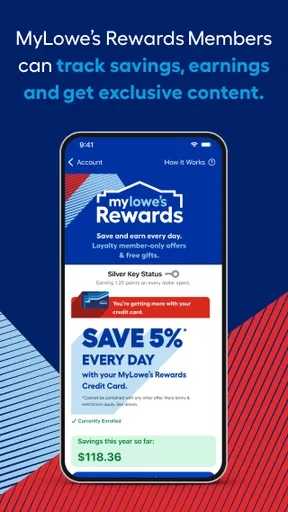
- Loyalty rewards program integration.
- Access to exclusive deals and promotions.
Cons
- Occasional app crashes reported.
- Some users find search function glitchy.
- Limited features compared to desktop site.
- Infrequent updates slow to fix issues.
- Not all store locations available in app.
FAQs for Lowe's
What features does the Lowe's app offer?
The Lowe's app offers a wide range of features designed to enhance the shopping experience. Users can browse products, check real-time inventory, access weekly deals, and enjoy personalized recommendations. Additionally, the app allows for easy purchase tracking, project planning, and a store locator for quick shopping trips.
Is the Lowe's app free to download and use?
Yes, the Lowe's app is completely free to download and use on both Android and iOS devices. While there are no in-app purchases, users can make purchases of products directly through the app. Regular updates ensure that users have access to the latest features and improvements.
Can I manage my Lowe's account through the app?
Absolutely. The Lowe's app provides comprehensive account management capabilities. Users can log in to their MyLowe’s account to track orders, manage purchase history, save favorite items, and access exclusive offers. This functionality helps streamline the shopping process and keeps all essential information in one place.
How accurate is the inventory information on the Lowe's app?
The Lowe's app is designed to provide real-time inventory information. While it strives for accuracy, occasional discrepancies may occur due to high demand or system updates. It's always a good idea to call your local store to confirm availability, especially if you're planning a special trip to purchase an item.
Does the Lowe's app offer customer support features?
Yes, the Lowe's app includes several customer support features. Users can access a help center with FAQs, contact customer service via phone or email, and find guidance on returns and exchanges. The app also offers a virtual chat assistant for quick answers to common questions, ensuring a smooth shopping experience.


